My first semi-original post. I haven’t written many WordPress posts, and this counts as one of them. A tabbed sidebar widget: I learned this from my buddy Mumu (though Mumu’s tabbed sidebar widget can’t be dragged and dropped), then I also borrowed from my buddy Fenwen’s code, master willin’s code (the recent comments code), and code from other folks… Finally I built it into my theme and ended up with a widget you can drag and drop. So what’s a drag-and-drop widget, one you can activate and remove?
These are drag-and-drop widgets: you drag a widget into the sidebar to activate it, and drag it back out to disable it and delete its settings. To make this work I dug through a lot of material. At first I only looked for Chinese resources, but there wasn’t much good Chinese material on widgets, so I had to go through the WordPress Codex, and sure enough, I found it. Here’s the link This document covers the Widget API, meaning which hooks your functions attach to and what they do; it all goes through the API. The official docs give a really good example, and that’s the example I modified. Now about Mumu’s tabbed widget: you can see it in my sidebar. Let’s go straight to the steps
First, load the jQuery library inside the head tag of header.php in your theme folder.
In the folder of the theme you’re using, find the theme functions file (functions.php) and add the following code to it (I agonized over this code for two days… only squeezed it out on the night of the 12th… it was hard work…):
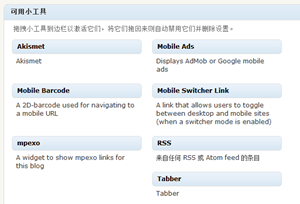
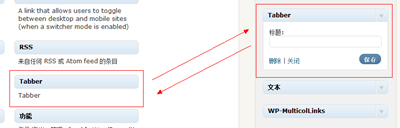
Now go to your Widgets page. Do you see a widget called tabber?
Haha, if you see it, you’ve done it. If it didn’t work, or you get errors or anything, leave a comment and ask~~ I’ll patiently answer. In a few days I plan to turn this into a plugin… to make it easier for newbies… though I’m still not a fan of using plugins…
PS: The Codex is really good. It’s just a real shame that a lot of the English docs haven’t been translated into Chinese…
 Haha, if you see it, you’ve done it. If it didn’t work, or you get errors or anything, leave a comment and ask~~ I’ll patiently answer. In a few days I plan to turn this into a plugin… to make it easier for newbies… though I’m still not a fan of using plugins…